Free Focus Timer for Study Sessions and Breaks
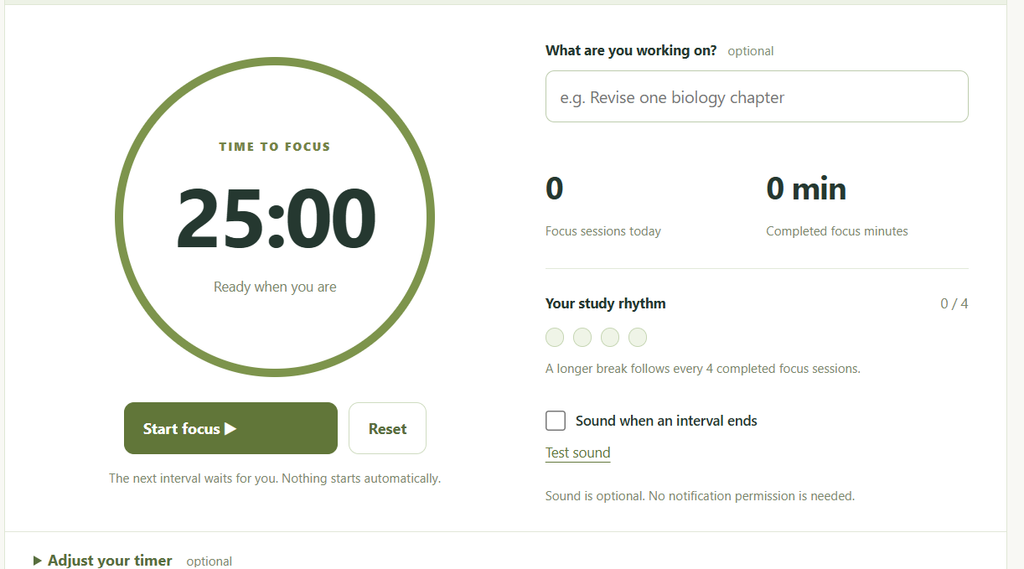
Use this focus timer to work on one task at a time. Choose a focus interval, pause when needed and take a short or long break when you are ready.
Sound is optional. Browsers can delay background alerts; keep the page open and awake when an immediate signal matters. No interval starts automatically.
How to use the focus timer
- Choose Focus, Short break or Long break.
- Add a task label if you want one, then select Start.
- Use Pause to stop the countdown temporarily and Resume to continue the same interval.
- When an interval finishes, the next mode is selected. Press Start when you are ready.
The default rhythm is 25 minutes of focus, 5 minutes for a short break and 15 minutes for a long break after four completed focus sessions. These are starting settings, not a requirement. Open Adjust your timer to choose durations that suit your session.
Adjust your study and break durations
You can set focus intervals from 1 to 180 whole minutes, short breaks from 1 to 60 minutes and long breaks from 1 to 120 minutes. Choose how many completed focus sessions lead to a longer break, from 1 to 12.
Applying new durations resets an incomplete interval after confirmation. Resetting or changing modes does not count an unfinished focus interval as completed. Completed session records remain until you clear history or remove browser data.
Understand your focus timer history
Completed focus minutes are the planned durations of fully completed focus intervals. They are not verified productive study time. Breaks and discarded incomplete intervals are not added to focus totals.
The timer keeps up to 120 completed focus records, including a completion timestamp, planned focus minutes and an optional task label. Today’s totals are based on these stored records and your device’s local date. Download history to keep a CSV copy.
Browser saving and background countdown
When local storage is available, the timer saves settings, the active deadline, task label and recent history in this browser. It does not automatically sync to other devices or upload those records through the timer tool.
The countdown uses an end time. Changing tabs or reloading does not intentionally restart the interval. If the page is suspended, it checks whether the saved interval ended when it runs again. Later intervals do not run while you are away, and a closed page cannot play sound.
Private browsing or storage restrictions may prevent saving. Clearing site data can remove the timer’s preferences and history. Use one timer tab for the clearest experience.
Focus timer frequently asked questions
Is the focus timer free?
Yes. The timer, custom settings and history export are free and require no account.
Does it send notifications?
No push notifications or emails are sent. Optional in-page sound does not require notification permission. Enable sound and select Test sound to check playback.
Can I combine it with a study plan?
Yes. Choose a task from your plan and start a focus interval. Task data is not automatically shared between tools. Open the Study Planner.
Is the next interval automatic?
No. The tool selects a suggested next mode but waits for you to press Start.