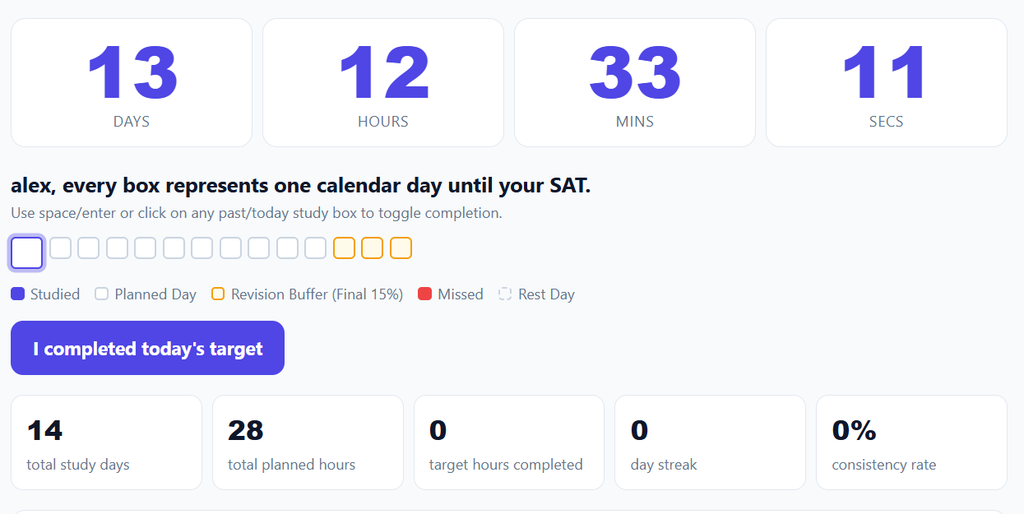
Build Your Exam Study Plan
Use this free exam study planner to count down to your exam, set a daily study goal and track how much of your syllabus you’ve covered. Choose an exam or enter your own, then add your exam date, study hours and chapter counts.
How to Plan Your Study Time Before an Exam
- Set your deadline. Select your exam and enter its date and time in your local time zone.
- Choose a daily target. Set the hours you can realistically study each day. Select Sundays off if you want a weekly rest day.
- Enter your syllabus progress. Add the total number of chapters or units and how many you’ve already completed.
- Review your timeline. Check your remaining study days and suggested pace. Mark study days complete as you go and update the plan if your schedule changes.
If you’ve completed 2 of 10 chapters, you have 8 left. With 14 study days available, you could aim for four chapters per week and set aside time for revision or practice questions.
Exam Study Planner FAQs
Can I use the planner for an exam that isn’t listed?
Yes. Choose Other / Custom Exam and enter your own exam name, date and time.
How is syllabus progress calculated?
The planner divides your completed chapters or units by the total and converts the result to a percentage. For example, 2 completed chapters out of 10 is 20%.
Can I change my daily study hours after creating a plan?
Yes. Move the hours slider and select Update current plan. The planner recalculates future study hours and keeps previously logged sessions.
Where is my exam plan saved?
Your plan is saved in the browser you used to create it. If you switch browsers or clear the site’s stored data, your saved plan may no longer be available.